# Adding & Configuring a Custom Domain
Vercel provides all deployments with a `vercel.app` URL, which enables you to share Deployments with your Team for collaboration. However, to provide greater personalization and flexibility to your project, you can instead add a custom domain. If you don't own a domain yet, you can [purchase it with Vercel](https://vercel.com/domains).
You can manage all domain settings related to a project from Settings and then Domains in the sidebar, regardless of whether you are using [apex domains](https://vercel.com/docs/domains/working-with-domains/add-a-domain#apex-domains) or [subdomains](https://vercel.com/docs/domains/working-with-domains/add-a-domain#subdomains) in your project. This document will guide you through both options.
Hobby teams have a limit of 50 custom domains per project.
## [Add and configure domain](https://vercel.com/docs/domains/working-with-domains/add-a-domain#add-and-configure-domain)[](https://vercel.com/docs/domains/working-with-domains/add-a-domain#add-and-configure-domain)
The following steps provide an overview of how to add and configure a custom domain in Vercel:
1. ### [Navigate to Domain Settings](https://vercel.com/docs/domains/working-with-domains/add-a-domain#navigate-to-domain-settings)[](https://vercel.com/docs/domains/working-with-domains/add-a-domain#navigate-to-domain-settings)
On the [dashboard](https://vercel.com/dashboard), pick the project to which you would like to assign your domain.
Once you have selected your project, open Settings in the sidebar and then select [Domains](https://vercel.com/d?to=%2F%5Bteam%5D%2F%5Bproject%5D%2Fsettings%2Fdomains&title=Go+to+Domains+Settings).
2. ### [Add your domain](https://vercel.com/docs/domains/working-with-domains/add-a-domain#add-your-domain)[](https://vercel.com/docs/domains/working-with-domains/add-a-domain#add-your-domain)
Add your domain from the dashboard or the Vercel CLI.
DashboardCLI
From the Domains page, click the Add Domain button:

The button to click on the domains page.
Input the domain you wish to include in the project:
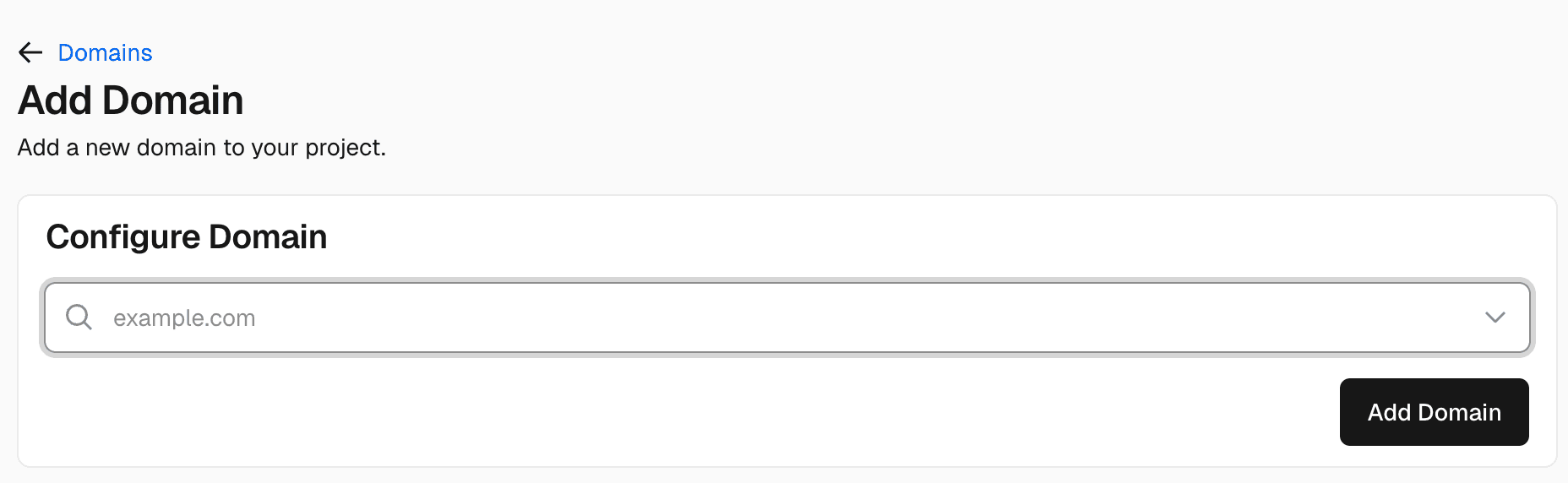
Text input on the add domain page to input your domain name in.
If you add an apex domain (e.g. `example.com`) to the project, Vercel will prompt you to add the `www` subdomain prefix. For more information about why we recommend using a `www` domain, see "[Redirecting `www` domains](https://vercel.com/docs/domains/working-with-domains/deploying-and-redirecting#redirecting-www-domains)".
3. ### [Using wildcard domain](https://vercel.com/docs/domains/working-with-domains/add-a-domain#using-wildcard-domain)[](https://vercel.com/docs/domains/working-with-domains/add-a-domain#using-wildcard-domain)
You can also use your custom domain as a wildcard domain by prefixing it with `*.`.
Vercel needs access to DNS challenges to issue and renew wildcard certificates. Use the [nameservers method](https://vercel.com/docs/domains/working-with-domains/add-a-domain#vercel-nameservers), or [delegate certificate validation](https://vercel.com/docs/domains/working-with-domains/add-a-domain#use-wildcard-domains-with-an-external-dns-provider) if you can't change your domain's nameservers.
To add a wildcard domain, use the prefix `*`, for example `*.acme.com`.

A wildcard domain being deployed.
#### [Use wildcard domains with an external DNS provider](https://vercel.com/docs/domains/working-with-domains/add-a-domain#use-wildcard-domains-with-an-external-dns-provider)[](https://vercel.com/docs/domains/working-with-domains/add-a-domain#use-wildcard-domains-with-an-external-dns-provider)
If you can't change your domain's nameservers, delegate the `_acme-challenge` subdomain to Vercel for certificate issuance and renewal. Your existing DNS provider continues to manage the rest of your DNS records, including the wildcard record that routes traffic to Vercel.
The following steps use the `acme.com` DNS zone and cover both `*.acme.com` and `*.foo.acme.com`. The apex domain is `acme.com`; neither wildcard configures the apex domain itself.
Use this workaround only if you can't change your domain's nameservers. Delegating the challenge can prevent other hosting providers from issuing or renewing certificates that use the same challenge name.
1. Add your wildcard domain to your project's Settings > Domains.
2. In your team's Domains page, select `acme.com`. Under DNS Records, click Enable Vercel DNS. Keep your existing nameservers configured at your registrar.
3. At your existing DNS provider, add both `NS` records for the wildcard you're configuring. The names below are relative to the `acme.com` DNS zone:
|Wildcard domain|Type|Name|Value|
|---|---|---|---|
|`*.acme.com`|`NS`|`_acme-challenge`|`ns1.vercel-dns.com.`|
|`*.acme.com`|`NS`|`_acme-challenge`|`ns2.vercel-dns.com.`|
|`*.foo.acme.com`|`NS`|`_acme-challenge.foo`|`ns1.vercel-dns.com.`|
|`*.foo.acme.com`|`NS`|`_acme-challenge.foo`|`ns2.vercel-dns.com.`|
If your provider requires a full record name, use `_acme-challenge.acme.com` or `_acme-challenge.foo.acme.com`, respectively. These records delegate certificate validation; they don't route website traffic.
4. At the same DNS provider, add the matching wildcard `CNAME` record to route traffic to Vercel:
|Wildcard domain|Type|Name|Value|
|---|---|---|---|
|`*.acme.com`|`CNAME`|`*`|`cname.vercel-dns-0.com.`|
|`*.foo.acme.com`|`CNAME`|`*.foo`|`cname.vercel-dns-0.com.`|
5. After the records propagate, check the domain's configuration and certificate status in your project's Settings > Domains. Keep the `NS` records in place so Vercel can renew the certificate automatically.
4. ### [Configure the domain](https://vercel.com/docs/domains/working-with-domains/add-a-domain#configure-the-domain)[](https://vercel.com/docs/domains/working-with-domains/add-a-domain#configure-the-domain)
Once you have added your custom domain, you will need to configure the DNS records of your domain with your registrar so it can be used with your Project. The dashboard will automatically display different methods for configuring it:
- If the domain is in use by another Vercel account, you will need to [verify access to the domain](https://vercel.com/docs/domains/working-with-domains/add-a-domain#verify-domain-access), with a TXT record
- If you're using an [Apex domain](https://vercel.com/docs/domains/working-with-domains/add-a-domain#apex-domains) (e.g. example.com), you will need to configure it with an A record
- If you're using a [Subdomain](https://vercel.com/docs/domains/working-with-domains/add-a-domain#subdomains) (e.g. docs.example.com), you will need to configure it with a CNAME record
Both apex domains and subdomains can also be configured using the [Nameservers](https://vercel.com/docs/domains/working-with-domains/add-a-domain#vercel-nameservers) method.
Before changing nameservers, [copy your existing DNS records](https://vercel.com/docs/domains/managing-dns-records#migrating-dns-records-from-an-external-registrar) to Vercel, including MX records for email and any verification TXT records. Changing only the website's A or CNAME record at your current DNS provider does not require moving the rest of your DNS records.
#### [Apex domains](https://vercel.com/docs/domains/working-with-domains/add-a-domain#apex-domains)[](https://vercel.com/docs/domains/working-with-domains/add-a-domain#apex-domains)
You can configure apex domains with an A record.
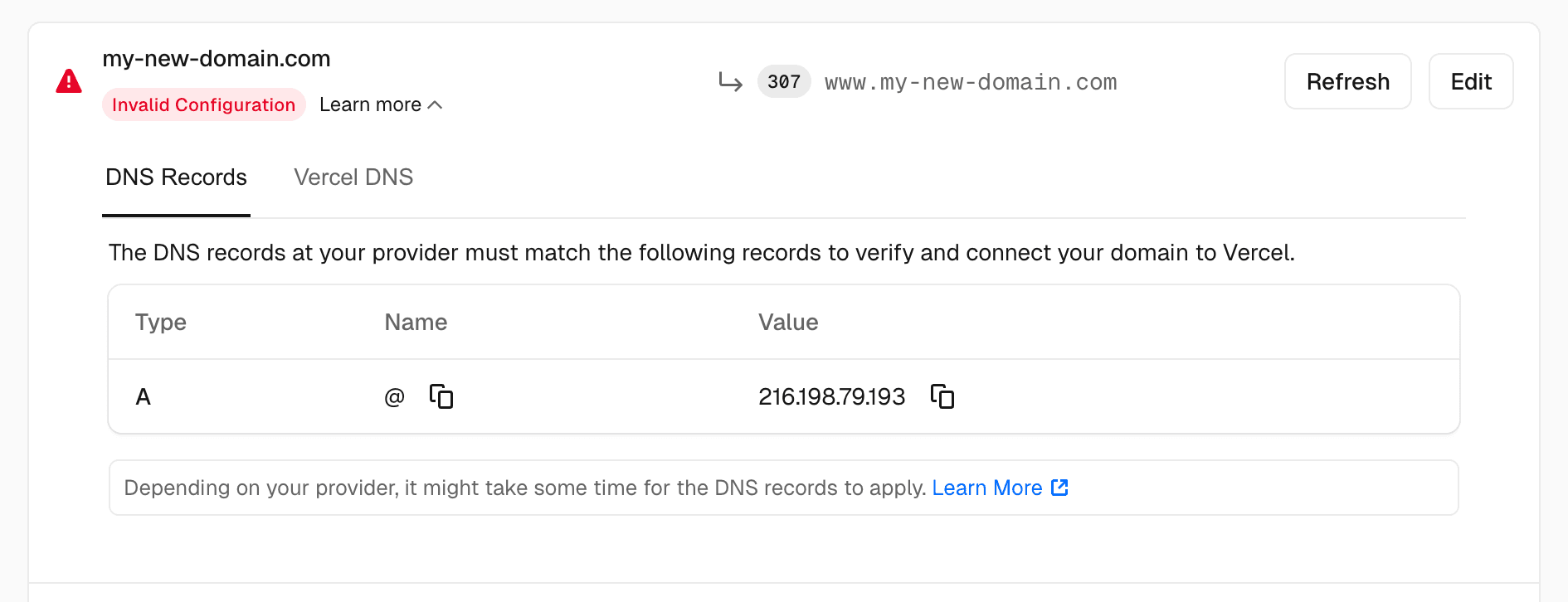
DNS configuration for an apex domain.
#### [Subdomains](https://vercel.com/docs/domains/working-with-domains/add-a-domain#subdomains)[](https://vercel.com/docs/domains/working-with-domains/add-a-domain#subdomains)
You can configure subdomains with a CNAME record. Each project has a unique CNAME record e.g. `d1d4fc829fe7bc7c.vercel-dns-017.com`.
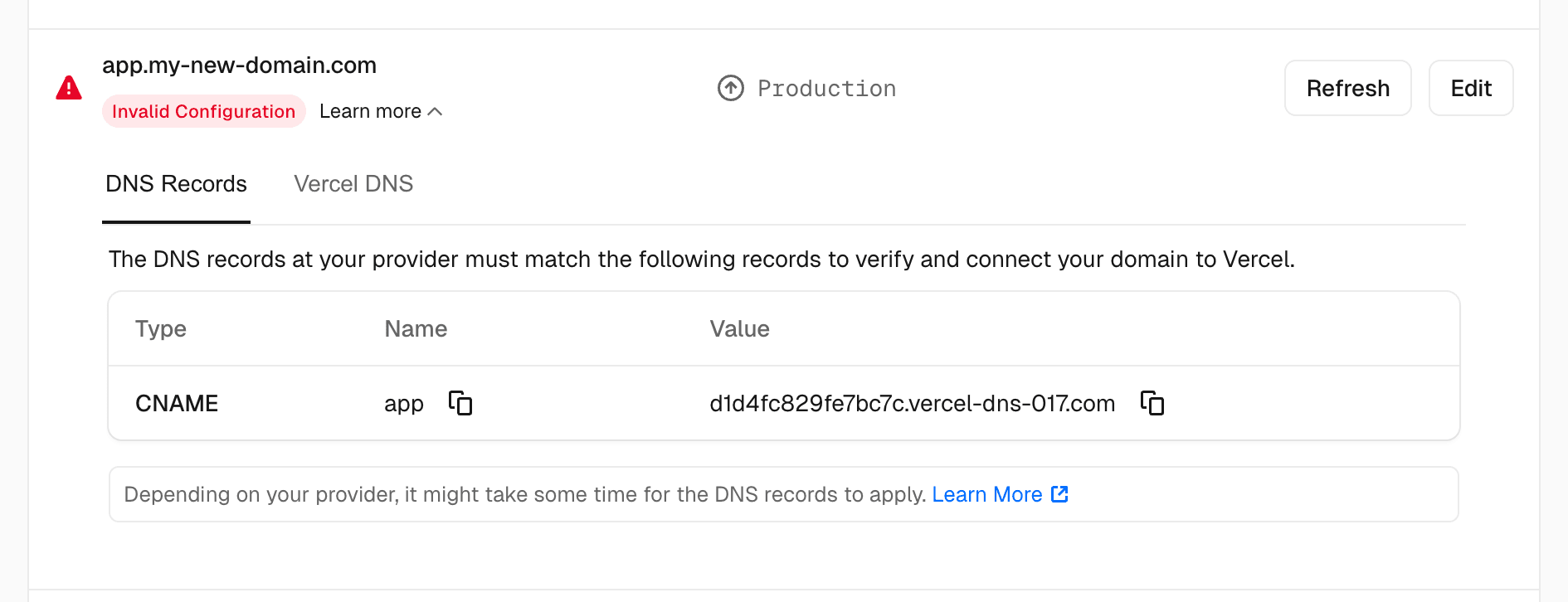
DNS configuration for a subdomain.
#### [Vercel Nameservers](https://vercel.com/docs/domains/working-with-domains/add-a-domain#vercel-nameservers)[](https://vercel.com/docs/domains/working-with-domains/add-a-domain#vercel-nameservers)
If you choose to use a wildcard domain Vercel's nameservers will be automatically enabled for you on saving the domain settings. You will then be provided with the Vercel nameservers to copy and use with your registrar.
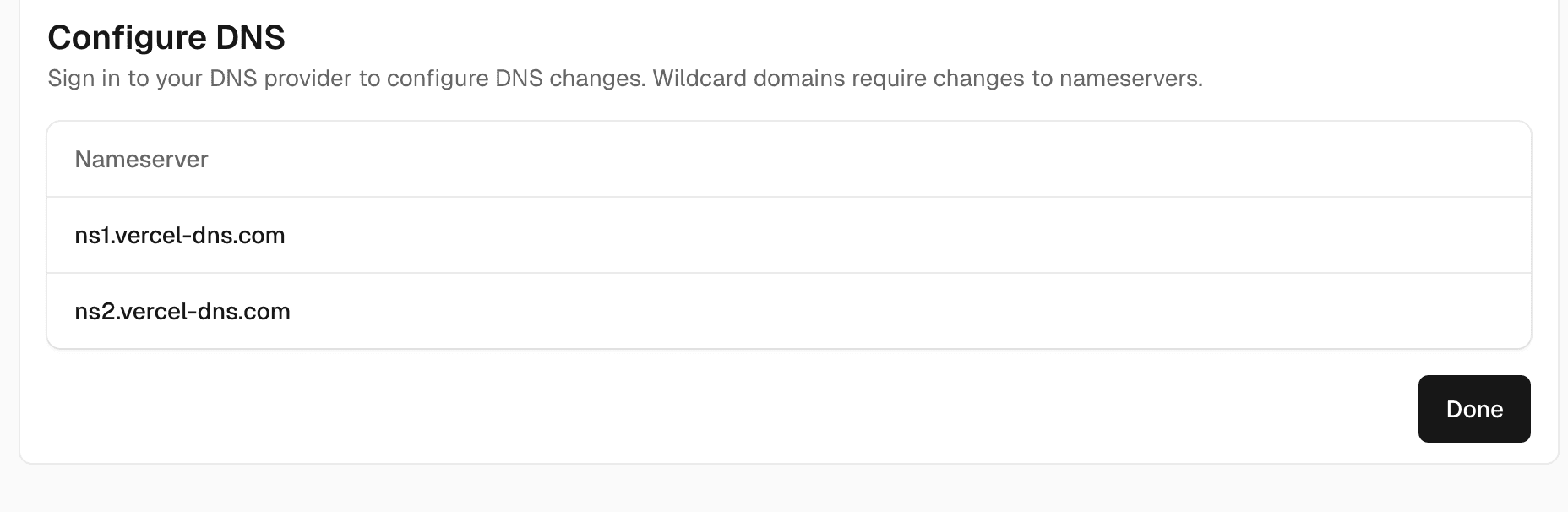
DNS configuration for Vercel nameservers.
5. ### [Verify domain access](https://vercel.com/docs/domains/working-with-domains/add-a-domain#verify-domain-access)[](https://vercel.com/docs/domains/working-with-domains/add-a-domain#verify-domain-access)
If the domain is in use by another Vercel account or team, you may be prompted to verify access to the domain with a `TXT` record. This will not move the domain into your account, but will allow you to use it in your project.
This also lets you use a subdomain whose apex domain belongs to another team, sometimes called subdomain delegation. For example, to use `ai.example.com` in one team while `example.com` stays with another:
1. In your project's Settings > Domains, add only the subdomain (`ai.example.com`). You don't need to add or move the apex domain.
2. Copy the `TXT` record Vercel shows. It is always created at `_vercel` on the apex domain (`_vercel.example.com`).
3. Add the record wherever DNS for the apex domain is managed. If the apex uses Vercel DNS, a member of the team that owns it adds the record from that team's Domains page.
You can verify several domains on the same apex domain. Each one gets its own value, and they can exist as separate `TXT` records at `_vercel`. If you remove a domain from a project and add it again, Vercel generates a new value, so update the record.
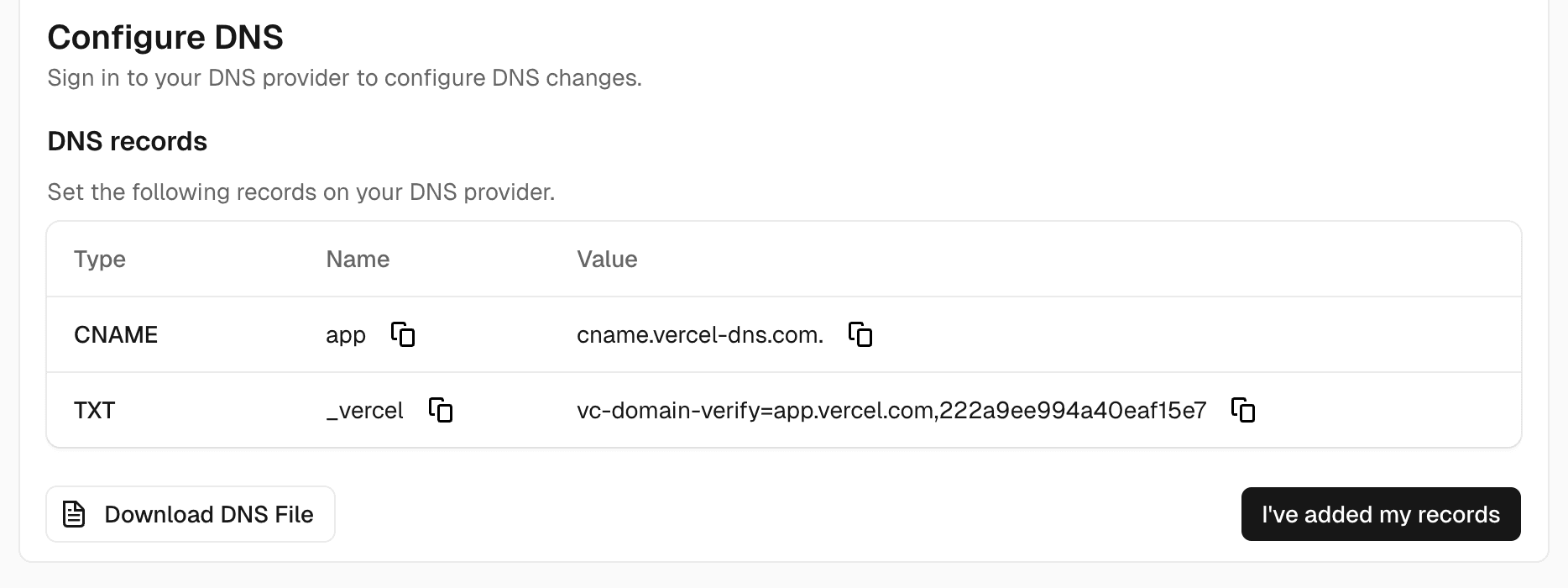
Verify domain access.
Once the domain has been configured and Vercel has verified it, the status of the domain will be updated within the UI to confirm that it is ready for use.
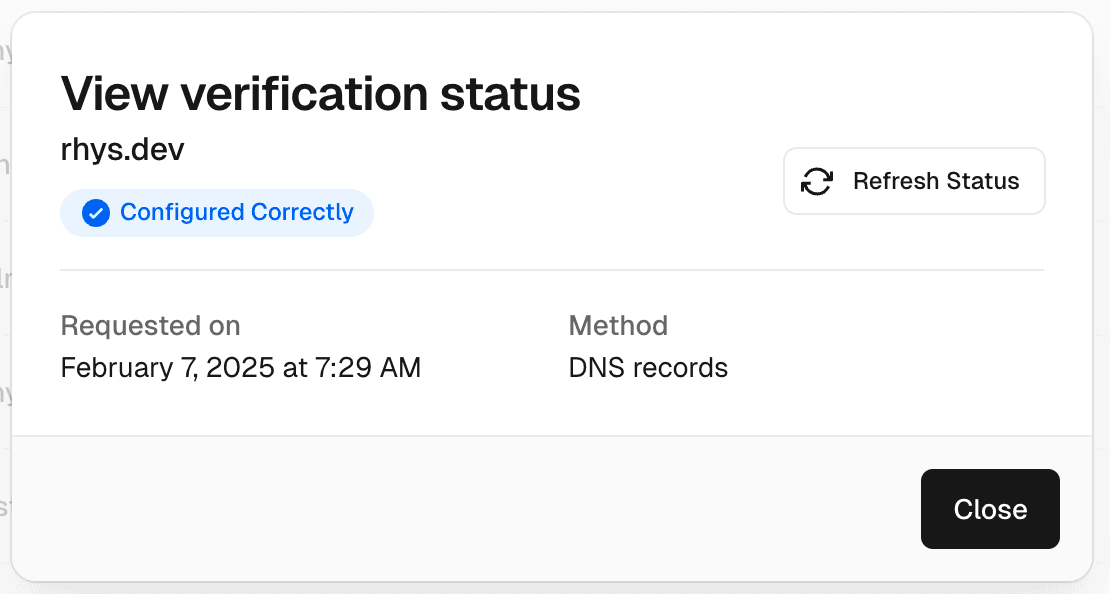
Properly configured domain.
If a someone visits your domain with or without the "www" subdomain prefix, Vercel will attempt to redirect them to your domain. For more robust protection, you should explicitly add this domain and [redirect it](https://vercel.com/docs/domains/working-with-domains/deploying-and-redirecting#redirecting-domains).
## [Troubleshooting domain setup](https://vercel.com/docs/domains/working-with-domains/add-a-domain#troubleshooting-domain-setup)[](https://vercel.com/docs/domains/working-with-domains/add-a-domain#troubleshooting-domain-setup)
If the domain does not show a valid configuration, compare the records at your authoritative DNS provider with the values shown in the project's Domains settings.
|Symptom|What to check|
|---|---|
|The domain has an invalid configuration|Check for conflicting A, AAAA, or CNAME records for the same hostname. Use the values shown for your project rather than copying another project's records.|
|A subdomain does not resolve|For `www.example.com`, use `www` as the record name in Vercel's DNS form. Other DNS providers may use a different name format.|
|The apex domain works but `www` does not, or the reverse|Add both domains to the project and [configure a redirect](https://vercel.com/docs/domains/working-with-domains/deploying-and-redirecting#redirecting-domains) to your preferred domain.|
|Email stopped arriving after a nameserver change|Restore your email provider's records using the [email troubleshooting steps](https://vercel.com/docs/domains/managing-dns-records#troubleshooting-email-delivery).|
DNS changes can take time to propagate. Use [DNS verification](https://vercel.com/docs/domains/managing-dns-records#verifying-dns-records) to compare the published records, and see [domain troubleshooting](https://vercel.com/docs/domains/troubleshooting) for configuration and certificate errors.
Last updated September 16, 2026
---
[
Previous
Working with Domains
](https://vercel.com/docs/domains/working-with-domains)